Introduction
Before we start learning Morse Code, the information below gives you
a brief background about Morse Code over the years.
When you get down to "Learning Morse Code", follow these instructions
and you should be able to send and receive CW at 15wpm, after you
have finished the lessons using the Teach Morse Program.
73 and have fun, Rob ZL3RS
What is CW or Morse Code, and why Is It Still Used?
Morse code converts letters, numbers, and punctuation into patterns
of short and long signals, called dots and dashes, but referred to as
dit and dahs, so they can be transmitted over long distances.
Methods in sending morse are by sound, light, radio waves or even by
tapping a finger or by vibration.
It was originally designed for the electric telegraph in the 1830s
and 1840s, but in 1999 it was phased out for maritime distress
communication and replaced it with the global Maritime Distress and
Safety System (GMDSS).
Morse Code still remains active today across aviation, amateur radio,
emergency signalling, and assistive technology for people with
disabilities.
Aviation uses Satellite GPS for tracking but still uses morse code
for beacons on the outer markers of airports.
How the Code Works.
Every character in Morse code is represented by a unique combination
of dits (dots) (short signals) and dah’s (dashes) (long signals).
The letter “E” is a single dit. The letter “T” is a single dah. More
complex letters use longer sequences: “Q” is dah-dah-dit-dah.
Spaces between dits and dah’s separate individual characters, and
longer pauses separate words.
The International Telecommunication Union maintains the official
standard for Morse code, which defines the exact dit and dah pattern
for every letter, number, and common punctuation marks.
This ensures that a message sent from anywhere in the world can be
read by anyone who knows the code, regardless of what language they
speak.
Speed is measured in words per minute (WPM) using the word “PARIS” as
a standard benchmark, because “PARIS” plus a trailing space works out
to exactly 50 signal units.
If someone sends Morse at 20 WPM, they can transmit the word “PARIS”
20 times in 60 seconds by skilled operators.
Morse Code in Radio Communications.
When radio replaced the telegraph, Morse code made the leap easily.
In amateur radio, morse is known as
CW which stands for
(
Continuous
Wave) It is a mode, that has a significant
technical advantage over voice.
A CW signal occupies a bandwidth of only about 50 Hertz, compared to
2,500 Hertz for a single voice transmission.
That means dozens of Morse conversations can fit into the same radio
spectrum space that one voice call would use.
That narrow bandwidth also makes Morse code remarkably effective in
poor conditions.
A receiver can filter out almost everything except
the exact frequency being used, cutting through noise and
interference that would make a voice signal unintelligible.
The human brain turns out to be exceptionally good at picking Morse
code signals out of static, even in conditions where computers
struggle.
For these reasons, CW remains a popular choice for long-distance
communication at low power levels, even with modern digital modes
available.
Emergency Signalling and SOS.
The most famous Morse code sequence is SOS. Three dits, three dah’s,
three dits. Save our Souls (SOS) was adopted as the international
distress signal at the Berlin Radiotelegraphic Conference, replacing
the older “CQD” code. CQ (Calling any Station) and D (Distress) The
letters themselves don’t stand for anything.
They were chosen because
the pattern is distinctive and almost impossible to mistake for
anything else, even, through heavy interference.
At 11:40 pm on 14 April 1912, RMS Titanic – the largest ship cruising
the world’s oceans at that time – hit an iceberg in the North
Atlantic during its maiden voyage.
Two hours and forty minutes later, at 2:20 am on 15 April 1912, the
“unsinkable” passenger ship sank with the loss of more than 1,500
lives.
As the disaster was unfolding, the giant cruise ship sent out a
series of desperate messages using its state-of-the-art wireless
telegraphy equipment.
Three letters are associated with 20th century disasters at sea: SOS.
Even though those three letters are forever associated with sea
tragedies, they were not the original distress call used by wireless
operators.
In fact, one of the more famous modern sea disasters, the sinking of
the Titanic, initially used three different letters that were the
original distress call: CQD.
Unsure whether to use the new SOS code or use the old CQD signal.
Beyond maritime radio, the SOS pattern can be tapped on a surface,
flashed with a flashlight, or even blinked with your eyes.
This makes it one of the most versatile distress signals ever created.
Aviation Navigation
Pilots still use Morse code every day, even if they never learn to
send it. Ground-based navigation beacons called VORs and NDBs each
broadcast a unique Morse code identifier.
A short sequence of dits and dah’s that corresponds to the station’s
three-letter name.
When a pilot tunes to a navigation frequency, they listen for that
identifier to confirm they’re receiving the correct station.
This matters especially in areas where signals from multiple beacons
overlap on nearby frequencies.
Voice identification is available on some stations, but Morse code
identification is considered more reliable.
Assistive Technology for Communication
Morse code has found a second life as a communication tool for people
with severe physical disabilities.
Because the entire system relies on just two inputs (short and long),
it can be operated by almost any voluntary movement a person can
still control.
People who cannot speak or use their hands can trigger dits and dahs
through eye blinks, head movements, or even a single switch pressed
by a toe or cheek.
This approach builds on a broader category of assistive technology
that translates facial expressions, gestures, or eye movements into
speech or text.
Morse code’s simplicity makes it especially well-suited for this
purpose, since the user only needs to master two distinct signals
rather than navigate a complex interface.
International Morse Code
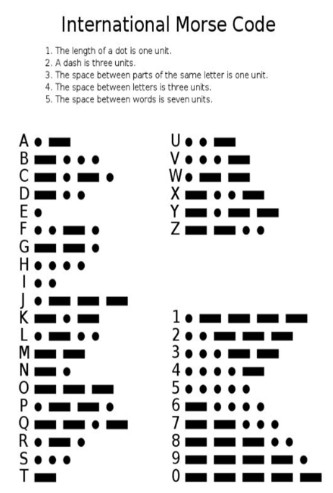
Learning Morse Code
During the Covid period and lockdown in 2020, Credit goes to David
ZL1DK who came up with the idea to start teaching CW on HF using the
80m band and the National System.
There were three of us who helped to teach morse code for those who
wanted to learn or refresh their skills.
David ZL1DK, Rob ZL1RJS and Peter ZL1PX. We took turns in teaching
morse on different days of the week.
I recommend that you read all this article first before installing
the morse program and downloading the lessons so you understand the
instructions and tips.
Download the files (using the links below) the program Teach Morse
from the NZART's website and follow the install procedure below.
Once The program is installed, download the training lessons, these
are text files created in notepad. Read the instructions on how to
use the program.
When learning morse, don't over do it, half an hour to 40 minutes a
day is enough.
About the Lessons
These lessons below have been timed, so cut n paste the day's lesson,
one day at a time. When you cut n paste the lesson, pay attention to
the word per minute (wpm) changes.
e.g. If you see 19/6wpm, change the character speed to 19 and the
wpm to 6wpm. The wpm will change again at Day 13, then adjust the
programs wpm to 7, always leaving the character speed remaining at 19.
Use a straight key first before you start using any electronic keyers
or bug keys. Sending morse is a art and learning on a straight key is
a lot easier than you may think.
Most people can start off easy by memorizing the sound patterns for
common letters (E, T, O, A, I, N, and slowly adding the rest, with
numbers up to the full alphabet plus punctuations.
Adding numbers in 0, 1 up to 9 and the punctuations we will also
learn are the: Full stop, Comma, Semi-colon, Question mark and the
Forward Slash.
The training lesson 1 will start by first introducing 4 Characters,
a full stop, 2 letters, and one number. It will start off with a full
stop.
This is done as we will use this punctuation every time a new group
of characters starts so when you hear, dit dah dit dah dit dah, it
will follow with a new group of characters.
When a new character is introduced, one is sent first, followed by 5
more of the same character, so to familiarise you to the new
character.
It will pause each time after sending that group. It is normally read
back to you and then you will hear that same group again. before
moving onto the next group.
I am sure you will pick it up as you go.
If you have a partner, they can send it to you and then read it back,
otherwise you will have to start and unpause the program yourself
along the way.
If you are learning on your own, once you have loaded the text for
the day you are on then, untick the box for the left window, so you
cannot see the characters. The right window is what has been sent.
Do not look at the screen until the program pauses so you can check
for any errors. As said, once those characters have been sent, you
will hear them again, followed by a full stop and then a new group.
You could also untick this box to hide the right window on what is
being sent, so once it pauses, you can tick the box again to see what
has just been sent to compare how well you did.
TIP 1: When you hear a character being sent, you will have
another character coming up, so if you cannot think of it or are
unsure of the character,
DO NOT think about it, put a dot and
move on and listen for the next character.
If you were to think about that character, you will miss the next few
characters. In normal sending by missing a character you can normally
pick up the word being sent.
Tip 2: If you can, cover up each character on what you
are writing down so you don't try and predict the word. This can
throw your train of thought, so write down what you hear.
Tip 3: Learn all the characters first, and get yourself up to
speed before you start sending any morse with a morse key. This is so
you do not pick up any bad habits with sending morse code.
If you can receive morse fluently, then sending should now not be a
problem.
In lesson 1, when you hear a full stop, it will be followed by a new
set of characters. Day 2's text will add in three new characters,
which then will be sent with the previous 4 characters added in and
so on.
Building up the characters, so after Day 20, all the characters will
have been sent and will then move on to short phrases.
Then, once you have most of the characters, the speed will be
increased from 6 to 7 wpm, so the speed increases on Day 10 and will
continue increasing over time.
Keep pushing and you will not notice the speed difference. The sound
remains the same, it is just the speed between each character becomes
faster.
The traditional method pairs each letter with a sound pattern: “dit”
for a dot and “dah” for a dash, so “A” sounds like “di-dah.”
Learning by sound rather than by looking at written dots and dashes
is faster, because it trains recognition at speed rather than visual
decoding.
Beginners typically start around 6 Words Per Minute (wpm) and these
lessons will work up gradually to acheive 15 wpm, or even higher
speeds if you want to go higher, you can run a day at a higher speed.
At higher speeds, experienced operators stop translating individual
letters and begin recognizing entire words and common phrases as
sound patterns.
Similar to how fluent readers see whole words rather than individual
letters. Mobile apps, online practice tools, and amateur radio clubs
all offer structured ways to build up your speed.
We all have our own methods and ways in learning Morse.
When using this program, I recommend that you learn all of the
characters first by adding the alphabet and numbers, punctuations etc
slowly.
You start off with a few characters, then adding the rest over time,
it will take about 20 days to introduce all the characters.
Once you have learnt all characters, then you can start using the
"Start teach" button, if you want, as it will then send characters at
random, or continue with the lessons.
This will test you all the characters. Many amateur radio operators
consider CW proficiency one of the most rewarding skills in this
hobby.
Teach Morse Program
The program Teach Morse we used when we started teaching
TeachMorse is a Windows application that works on Windows XP through
to Windows 10 and provides a way to play practice text at different
speeds.
It uses the Howard Cunningham teaching character string which is
similar to the ‘Koch’ method.
This software was originally written by Gary Bold ZL1AN (now Silent
Key) who was a long time contributor to NZART’s official Journal,
Break-In and was known as ‘The Morseman’ by many in the Amateur
Community.
The software is now maintained and enhanced by Andrew Mitchell ZL1AF
with ideas that was added from David and myself.
This made it easier for us when teaching using this program. Thanks,
Andrew.
Click on the link below download the file for TeachMorse v8 from
the NZART website:
Installation of Teach Morse
When you download the zip file, unzip and extract all files, it will
automatically create the directory "TeachMorseV8.02"
Locate the folder and click and run the TeachMorseV8.02.exe file.
If you get the blue "Windows Protected your PC" pop up,
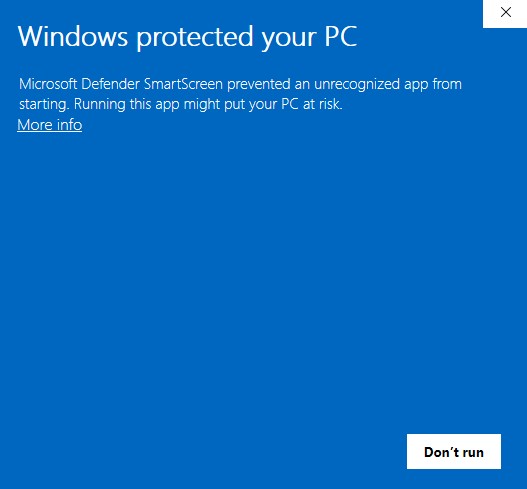
then click on
"more info"
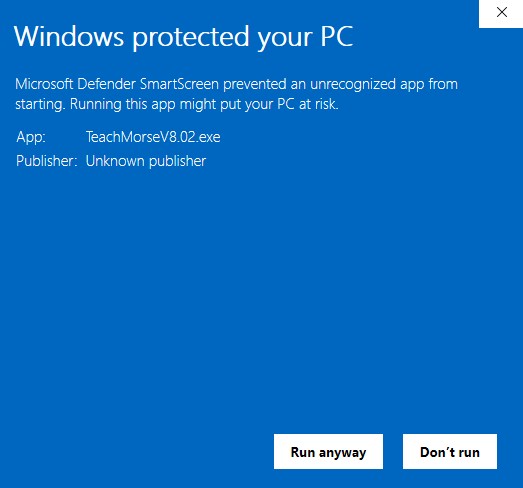
then click on
"Run Anyway"
It is
"Safe" to install this program.
This will now install and open the program once installed.
Training Files
Below are the files used when we were teaching Morse Clases.
You MUST start with lesson 1.
After downloading the files to your PC, open and load the first day's
lesson into the program. See the
"Instructions to Use" below
and
"How to learn Morse Code" above.
These Training morse files were created by
David ZL1DK. A lot of time
was spent in the making by adding the pauses and removing characters
that are not used.
Instructions to Use
Once you have the Morse Teaching Program open,
Set Up
lets start setting the
program.
Character Speed
In the middle of the program screen, you will see
"Character
Speed"
If you hover your mouse over the window of the character speed you
will see
"<" (on the left) and
">" (on the right)
click on the > to increase the character speed. Put that up to 19.
What this will do is when you play a character, you will hear it at
the speed at which it is normally sent. If this is set lower then
once you want to increase your speed then you will have to re-learn
the new sound.
By keeping this constant when learning, when you start increasing the
text speed, the letters just get closer or faster before you hear the
next character, so you will always hear the character sound at 19.
Text Speed with Farnsworth Spacing
Do the same for the text speed as you did for the character speed
except this controls the speed at which the characters are sent.
Start off at 6wpm.
Over time we will slowly increase the speed but learning the
characters start at 6wpm and you will be at 7wpm when all the
characters A - Z numbers and punctuations have been taught.
Watch the Lesson files for the wpm changes, You will see this at the
top of each day. e.g. 19/6 or just 7wpm as time moves on.
Saving the setting
We need to save these setting, so every time you open the program,
the setting will be remembered.
Otherwise, you will need to change these setting every time you open
the program.
On the left of the clock, find and Tick the box "Auto Save/ Load
Setting" By ticking this box will save your setting each time you
open and close the program.
Operation
Above the clock are the "SendText" "Pause"
When you add any text, click on "Load any File". This will open up
explorer in the documents folder.
Load your text file and the text will be shown in the left window.
Once you click on "Send Text" it will start sending morse.
If you have added any "Pipe" symbols in then it will pause sending.
You will see above the clock, the "Pause" button has changed from
"Pause" to "Unpause". You will need to click on "Unpause" to continue.
Each paragraph was timed to around 2 minutes.
The right text window shows what has just been sent from the left
window. These can also be turned on and off, by ticking the
"Show text" box under each window. (Default is ticked)
Font
You will also notice a "Font" button above the clock (to the right)
This will increase the font size in each window by clicking on the ^
or v controls. The font is default to "Consolas" this font shows the
difference between the letter O and the number 0 (zero) by putting a
line thro the zero.
I recommend not to change the font and only the font size if needed.
Hidden Feature
We wanted to add a pause into the program, to automatically stop the
text from continuing on while we checked, so we could read back the
text just sent before continuing on with the next paragraph.
This was done by adding the "Pipe" symbol
" | " (Above the
"Enter" key) which has the forward slash
\ key and has the
pipe symbol
| above it.
You add this pipe (" | ") symbol to pause the text at the end of each text
string.
Display Screens
The screen on the left loads all the text for each lesson.
The Screen on the right shows what text that has been sent.
Both these screens can be turned off. This is handy so you will not
be tempted to look up and see the character sent.
Lesson Text Files
There are 7 lessons and 136 days in total, but Lesson 1 will
introduce all the characters required to learn morse. It starts at
6wpm
Lesson 2, up to lesson 7 increases your speed so you need to do them
in order. By the time you get to Lesson 7, you will end up at 15wpm.
If you want to increase your speed higher than 15, then pick any of
the lessons from 2 to 7 and keep increasing your speed at the same
intervals as before.
From lesson 2, the full stop was a great way to let you know when to
start and when to stop. When you hear one full stop, get ready to go
and when you hear two full stops then sending has finished.
Each sentence lasts aproximately 3 minutes.
History of Samuel Morse
Samuel Finley Breese Morse, inventor of several improvements to the
telegraph, was born in Charlestown, Mass. on April 27, 1791.
As a student at Yale College, Morse became interested in both
painting and in the developing subject of electricity.
After his graduation in 1810, he first concentrated on painting,
which he studied in England. He would later become a well-known
portrait artist.
After moving to New York in 1825, he became a founder and the first
president of the National Academy of Design.
He also ran for office, but was defeated in both of his campaigns to
become New York mayor.
Meanwhile, Morse maintained a steady interest in invention, taking
out three patents for pumps in 1817 with his brother Sidney Edwards
Morse.
It wasn't until 1832 that he first became interested in telegraphy.
That year, Morse was traveling to the United States from Europe on a
ship when he overheard a conversation about electromagnetism that
inspired his idea for an electric telegraph.
Though he had little training in electricity, he realized that pulses
of electrical current could convey information over wires.
The telegraph, a device first proposed in 1753 and first built in
1774, was an impractical machine up until that point, requiring 26
separate wires, one for each letter of the alphabet.
Around that time, two German engineers had invented a five-wire
model, but Morse wanted to be the first to reduce the number of wires
used to one.
Between 1832 and 1837, he developed a working model of an electric
telegraph, using crude materials such as a home-made battery and old
clock-work gears.
He also acquired two partners to help him develop his telegraph:
Leonard Gale, a professor of science at New York University, and
Alfred Vail, who made available his mechanical skills and his
family's New Jersey iron works to help
construct better telegraph models.
Morse's first telegraph device, unveiled in 1837, did use a one-wire
system, which produced an EKG-like line on tickertape. The dips in
the line had to be de-coded into letters and numbers using a
dictionary composed by Morse.
This assumed that the pen or pencil wrote clearly, which did not
always happen. By the following year, he had developed an improved
system; he created a dot-and-dash code that used different numbers to
represent the letters of
the English alphabet and the ten digits.
(His assistant Vail has been credited by Franklin T. Pope, later a
partner of Thomas Edison, with inventing this "dots and dashes"
version).
This coding system was significantly better, as it did not require
printing or decoding but could be "sound read" by operators. In 1838,
at an exhibition of his telegraph in New York, Morse transmitted ten
words per minute using the
Morse code that would become standard throughout the world.
In 1842, Morse convinced Congress to provide $30,000 in support of
his plan to "wire" the United States. Meanwhile, Morse also solicited
and received advice from a number of American and European telegraphy
experts, including
Joseph Henry of Princeton, who had invented a working telegraph in
1831, and Louis Breguet of Paris.
In 1844, Morse filed for a patent (granted in 1849) of the printing
telegraph. He had already proved that his device worked over short
distances, and the Federal funds that he raised had allowed him to
string a wire from Baltimore
to Washington.
On May 11, 1844, Morse sent the first inter-city message. Soon
thereafter, he gave the first public demonstration, in which he sent
a message from the chamber of the Supreme Court to the Mount Clair
train depot in Baltimore.
The message itself was borrowed from the Bible by the daughter of the
Commissioner of Patents and said, "What hath God wrought?" By 1846,
private companies using Morse's patent had built telegraph lines from
Washington to
Boston and Buffalo and were pushing further.
The telegraph spread across the U.S. more quickly than had the
railroads, whose routes the wires often followed. By 1854, there were
23,000 miles of telegraph wire in operation. Western Union was
founded in 1851, and in 1866,
the first successful trans-Atlantic cable link was established.
Though Morse didn't invent the telegraph and did not single-handedly
create Morse Code, he may have been telegraphy's greatest promoter
and undoubtedly contributed to its rapid development and adoption
throughout the
world.
Morse died of pneumonia in New York on April 2, 1872. Late in his
life, he shared his considerable wealth through grants to colleges
such as Yale and Vassar, in addition to charities and artists.
Citations
https://lemelson.mit.edu/resources/samuel-morse
https://nzart.org.nz/learn/morse-code-learning-tools/
